
System-Level Runner Integration
Overview
System administrators can add machines in the Admin Management Platform as Runners for Cloud Native Build/Workspaces functionality, available for users.
CNB supports Linux, Mac, and Windows build machines.
Two Hosting Modes
For specific usage, see Admin Configuration and Runner Configuration.
System Hosting (Default)
Machines managed by the CNB platform require mutual access between the machine and the platform. Added via ip:port.
Self-Hosting
Machines managed by users themselves only require direct access to the CNB platform. Added via a unique identifier.
System Environment Requirements
Linux Build Machines
- TencentOS 3.2 / TencentOS 3.1 / CentOS 8 and derivatives
- Kernel version 5.4+ recommended
- docker >= 26.1.5
- Ports 8087 and 8088 must be available for listening
Mac Build Machines
- git >= 2.43.0
- Ports 8087 and 8088 must be available for listening
Since Mac does not support OverlayFS, second-read cloning will degrade to normal cloning.
Windows Build Machines
- Recommended Windows 10 or above
- git >= 2.43.0
- Ports 8087 and 8088 must be available for listening
Since Windows does not support OverlayFS, second-read cloning will degrade to normal cloning.
Configuration Process
1. Configure Linux Build Machines (Standard Solution)
a-download.sh
b-sysctl.sh
c-raid0.sh
d-daemon-json.sh
e-install-docker.sh
f-install-docker-plugin.sh
g-install-runner-config.sh
h-install-runner.sh
i-install-binfmt.sh
j-install-clean-cgroup.sh
#!/bin/bash
# =============================================================================
# Script:     a-download.sh
# Description: Download Docker components required by CI Runner to files/ directory
# Note:       Downloads include Docker binaries, docker-compose, docker-buildx
#             Downloads both x86_64 and aarch64 architectures, filenames suffixed with architecture
#             GitHub resources support proxy acceleration, set USE_GITHUB_PROXY=true to enable
# Usage:      USE_GITHUB_PROXY=true ./a-download.sh
# =============================================================================

set -eo pipefail

# -----------------------------------------------------------------------------
# Constants
# -----------------------------------------------------------------------------
TARGET_DOCKER_VERSION="27.5.1"
TARGET_COMPOSE_VERSION="v2.40.3"
TARGET_BUILDX_VERSION="v0.21.0"
DOWNLOAD_DIR="$(cd "$(dirname "$0")/files" && pwd)"
mkdir -p "$DOWNLOAD_DIR"

# GitHub proxy, set USE_GITHUB_PROXY=true to enable proxy
GITHUB_PROXY_BASE="https://ghfast.top"

# Build GitHub download URL, use proxy based on USE_GITHUB_PROXY
github_url() {
    local url="$1"
    if [[ "${USE_GITHUB_PROXY}" == "true" ]]; then
        echo "${GITHUB_PROXY_BASE}${url}"
    else
        echo "$url"
    fi
}

# -----------------------------------------------------------------------------
# Download for all architectures
# -----------------------------------------------------------------------------
for HOST_ARCH in x86_64 aarch64; do
    ARCH="${ARCH_MAP[$HOST_ARCH]}"
    echo "========================================"
    echo "Downloading for ${HOST_ARCH} (${ARCH})"
    echo "========================================"

    # Docker binaries
    echo "[1/3] Docker ${TARGET_DOCKER_VERSION}..."
    wget --show-progress -O "${DOWNLOAD_DIR}/docker-${TARGET_DOCKER_VERSION}-${HOST_ARCH}.tgz" \
        "https://mirrors.cloud.tencent.com/docker-ce/linux/static/stable/${HOST_ARCH}/docker-${TARGET_DOCKER_VERSION}.tgz"

    # docker-compose
    echo "[2/3] docker-compose ${TARGET_COMPOSE_VERSION}..."
    wget --show-progress -O "${DOWNLOAD_DIR}/docker-compose-${HOST_ARCH}" \
        "$(github_url "https://github.com/docker/compose/releases/download/${TARGET_COMPOSE_VERSION}/docker-compose-linux-${HOST_ARCH}")"
    chmod +x "${DOWNLOAD_DIR}/docker-compose-${HOST_ARCH}"

    # docker buildx
    echo "[3/3] docker buildx ${TARGET_BUILDX_VERSION}..."
    wget --show-progress -O "${DOWNLOAD_DIR}/docker-buildx-${HOST_ARCH}" \
        "$(github_url "https://github.com/docker/buildx/releases/download/${TARGET_BUILDX_VERSION}/buildx-${TARGET_BUILDX_VERSION}.linux-${HOST_ARCH}")"
    chmod +x "${DOWNLOAD_DIR}/docker-buildx-${HOST_ARCH}"
done

echo "========================================"
echo "All downloads completed:"
ls -lh "${DOWNLOAD_DIR}/docker-${TARGET_DOCKER_VERSION}"-* \
      "${DOWNLOAD_DIR}/docker-compose-"* \
"${DOWNLOAD_DIR}/docker-buildx-"*#!/bin/bash
# =============================================================================
# Script: a-sysctl.sh
# Description: Install dependencies and configure kernel parameters (forwarding, inotify, IPv6, etc.)
# Note: Automatically adapts to dnf / yum / apt-get package managers
# Configuration is idempotent: existing parameters are updated, missing ones are appended
# =============================================================================
set -eo pipefail
# Install dependencies based on package manager
if command -v dnf &>/dev/null; then
dnf -y install lvm2 libcgroup-tools
elif command -v yum &>/dev/null; then
yum -y install lvm2 libcgroup-tools
elif command -v apt-get &>/dev/null; then
apt-get -y install lvm2 cgroup-tools
else
echo "Unsupported package manager" >&2
exit 1
fi
# -----------------------------------------------------------------------------
# Configure sysctl parameter: update if exists, append if not
# Usage: configure_sysctl "parameter" "value"
# -----------------------------------------------------------------------------
configure_sysctl() {
local param="$1"
local value="$2"
local conf_file="/etc/sysctl.conf"
if grep -q "^${param}\s*=" "$conf_file" 2>/dev/null; then
sed -i "s|^${param}\s*=.*|${param} = ${value}|" "$conf_file"
else
echo "${param} = ${value}" >> "$conf_file"
fi
}
# -----------------------------------------------------------------------------
# Configure kernel parameters
# -----------------------------------------------------------------------------
# Container runtime optimizations
configure_sysctl "net.ipv4.ip_forward" "1"
configure_sysctl "fs.inotify.max_user_instances" "10000"
configure_sysctl "fs.inotify.max_user_watches" "819200"
configure_sysctl "net.core.netdev_max_backlog" "65536"
# Disable IPv6
configure_sysctl "net.ipv6.conf.all.disable_ipv6" "1"
configure_sysctl "net.ipv6.conf.default.disable_ipv6" "1"
configure_sysctl "net.ipv6.conf.lo.disable_ipv6" "1"
# Apply configuration
sysctl -p#!/bin/bash
# =============================================================================
# Script: b-raid0.sh
# Description: Detect data disks and configure mount: single disk formatted directly, multiple disks create RAID0
# Note: System disk is automatically detected via df / and excluded
# Data disks are uniformly mounted to /data, using XFS filesystem (ftype=1)
# For multiple disks, automatically handles existing /dev/md0 or /dev/md127
# Requires mdadm tool to be installed in advance
# =============================================================================
set -eo pipefail
# -----------------------------------------------------------------------------
# Constants
# -----------------------------------------------------------------------------
MOUNT_POINT="/data"
RAID_DEVICE="/dev/md0"
FS_TYPE="xfs"
MOUNT_OPTS="defaults,pquota"
# Detect system disk and exclude it, get data disk list
SYSTEM_DISK=$(df / --output=source | tail -n1)
DATA_DISKS=$(lsblk -d -o NAME,TYPE | awk '/disk/ {print "/dev/"$1}' | grep -v "$SYSTEM_DISK" | grep -v "/dev/md")
DATA_DISK_COUNT=$(echo "$DATA_DISKS" | grep -c . || true)
# -----------------------------------------------------------------------------
# format_and_mount: Format device and mount to /data, also update fstab
# $1 - Device path, e.g. /dev/sdb or /dev/md0
# -----------------------------------------------------------------------------
format_and_mount() {
local device="$1"
if ! mountpoint -q "$MOUNT_POINT"; then
echo "mount $device to $MOUNT_POINT"
mkfs.xfs -f -n ftype=1 "$device"
mkdir -p "$MOUNT_POINT"
mount -o "$MOUNT_OPTS" "$device" "$MOUNT_POINT"
else
echo "$MOUNT_POINT is already mounted"
fi
# Update fstab: remove old UUID record for this device, append new record
local uuid
uuid=$(blkid -s UUID -o value "$device")
grep -v "$uuid" /etc/fstab > /etc/fstab.tmp || true
echo "UUID=$uuid $MOUNT_POINT $FS_TYPE $MOUNT_OPTS 0 0" >> /etc/fstab.tmp
mv /etc/fstab.tmp /etc/fstab
}
# -----------------------------------------------------------------------------
# Single disk mode: format data disk and mount directly
# -----------------------------------------------------------------------------
if [[ "$DATA_DISK_COUNT" -eq 1 ]]; then
echo "Data disk count equals 1"
format_and_mount "$DATA_DISKS"
df -Th
# -----------------------------------------------------------------------------
# RAID0 (multiple disks)
# -----------------------------------------------------------------------------
elif [[ "$DATA_DISK_COUNT" -gt 1 ]]; then
echo "Data disk count greater than 1"
if fdisk -l 2>/dev/null | grep -q '/dev/md0'; then
echo "/dev/md0 already exists"
elif fdisk -l 2>/dev/null | grep -q '/dev/md127'; then
echo "Found /dev/md127, migrating to /dev/md0"
mdadm --stop /dev/md127
mdadm --assemble "$RAID_DEVICE" --name=0 --update=name $DATA_DISKS
mdadm --detail --scan > /etc/mdadm.conf
else
echo "/dev/md0 does not exist, initializing"
yes | mdadm -C -a yes "$RAID_DEVICE" -l 0 -n "$DATA_DISK_COUNT" $DATA_DISKS
mdadm -D "$RAID_DEVICE"
mkfs.xfs -f -n ftype=1 "$RAID_DEVICE"
mdadm --detail --scan > /etc/mdadm.conf
fi
mkdir -p "$MOUNT_POINT"
format_and_mount "$RAID_DEVICE"
cat /etc/fstab
df -Th
# -----------------------------------------------------------------------------
# No data disks
# -----------------------------------------------------------------------------
else
echo "Data disk count less than 1, no disk operations performed"
fi#!/bin/bash
# =============================================================================
# Script: c-daemon-json.sh
# Description: Configure Docker daemon.json (data directory, registry mirrors, buildkit, etc.)
# Note: Docker data directory set to /data/docker, disk mount must be completed first
# Registry mirror uses Tencent Cloud internal address, only applicable to Tencent Cloud CVM
# =============================================================================
set -eo pipefail
mkdir -p /etc/docker
cat>/etc/docker/daemon.json<<EOF
{
"default-address-pools": [
{
"base": "172.17.0.0/12",
"size": 24
}
],
"data-root": "/data/docker",
"registry-mirrors": ["https://mirror.ccs.tencentyun.com"],
"features": {
"buildkit": true
}
}
EOF
#cat> /etc/docker/daemon.json <<EOF
#{
# "debug": true,
# "data-root": "/data/docker",
# "registry-mirrors": ["https://mirror.ccs.tencentyun.com"],
# "features": {
# "buildkit": true
# },
# "metrics-addr": "$(ip route get 1 | awk '{print $7; exit}'):9323",
# "icc": false,
# "bip": "172.17.0.1/16"
#}
#EOF
cat /etc/docker/daemon.json#!/bin/bash
# =============================================================================
# Script: d-install-docker.sh
# Description: Install Docker binaries and configure systemd services (docker, containerd)
# Note: Requires Docker tgz package already downloaded to files/ directory via a-download.sh
# Docker data directory is /data/docker, disk mount must be completed first
# After installation, docker, docker.socket, and containerd will be automatically enabled and started
# =============================================================================
set -eo pipefail
# -----------------------------------------------------------------------------
# Constants
# -----------------------------------------------------------------------------
SCRIPT_DIR="$(cd "$(dirname "$0")" && pwd)"
FILES_DIR="$SCRIPT_DIR/files"
TARGET_DOCKER_VERSION="27.5.1"
SERVICE_DIR="/usr/lib/systemd/system"
ARCH="$(arch)"
# -----------------------------------------------------------------------------
# Stop existing Docker services
# -----------------------------------------------------------------------------
systemctl stop docker docker.socket containerd 2>/dev/null || true
# -----------------------------------------------------------------------------
# Install Docker binaries
# -----------------------------------------------------------------------------
tar -xvf "${FILES_DIR}/docker-${TARGET_DOCKER_VERSION}-${ARCH}.tgz" -C /root/
cp /root/docker/* /usr/bin/
# -----------------------------------------------------------------------------
# Write docker.service
# -----------------------------------------------------------------------------
cat > "${SERVICE_DIR}/docker.service" << 'EOF'
[Unit]
Description=Docker Application Container Engine
Documentation=https://docs.docker.com
After=network-online.target docker.socket firewalld.service containerd.service time-set.target
Wants=network-online.target containerd.service
Requires=docker.socket
[Service]
Type=notify
EnvironmentFile=-/etc/sysconfig/docker
# the default is not to use systemd for cgroups because the delegate issues still
# exists and systemd currently does not support the cgroup feature set required
# for containers run by docker
ExecStart=/usr/bin/dockerd -H fd:// --containerd=/run/containerd/containerd.sock $OPTIONS
ExecReload=/bin/kill -s HUP $MAINPID
TimeoutStartSec=0
RestartSec=2
Restart=always
# Note that StartLimit* options were moved from "Service" to "Unit" in systemd 229.
# Both the old, and new location are accepted by systemd 229 and up, so using the old location
# to make them work for either version of systemd.
StartLimitBurst=3
# Note that StartLimitInterval was renamed to StartLimitIntervalSec in systemd 230.
# Both the old, and new name are accepted by systemd 230 and up, so using the old name to make
# this option work for either version of systemd.
StartLimitInterval=60s
# Having non-zero Limit*s causes performance problems due to accounting overhead
# in the kernel. We recommend using cgroups to do container-local accounting.
LimitNOFILE=infinity
LimitNPROC=infinity
LimitCORE=infinity
# Comment TasksMax if your systemd version does not support it.
# Only systemd 226 and above support this option.
TasksMax=infinity
# set delegate yes so that systemd does not reset the cgroups of docker containers
Delegate=yes
# kill only the docker process, not all processes in the cgroup
KillMode=process
OOMScoreAdjust=-500
[Install]
WantedBy=multi-user.target
EOF
# -----------------------------------------------------------------------------
# Write docker.socket
# -----------------------------------------------------------------------------
cat > "${SERVICE_DIR}/docker.socket" << 'EOF'
[Unit]
Description=Docker Socket for the API
[Socket]
ListenStream=/run/docker.sock
SocketMode=0660
SocketUser=root
SocketGroup=docker
[Install]
WantedBy=sockets.target
EOF
# -----------------------------------------------------------------------------
# Write containerd.service
# -----------------------------------------------------------------------------
cat > "${SERVICE_DIR}/containerd.service" << 'EOF'
[Unit]
Description=containerd container runtime
Documentation=https://containerd.io
After=network.target local-fs.target dbus.service
[Service]
ExecStartPre=-/sbin/modprobe overlay
ExecStart=/usr/bin/containerd
Type=notify
Delegate=yes
KillMode=process
Restart=always
RestartSec=5
LimitNPROC=infinity
LimitCORE=infinity
LimitNOFILE=infinity
TasksMax=infinity
OOMScoreAdjust=-999
[Install]
WantedBy=multi-user.target
EOF
# -----------------------------------------------------------------------------
# Enable and start services
# -----------------------------------------------------------------------------
systemctl daemon-reload
systemctl enable docker docker.socket containerd
systemctl start docker docker.socket containerd
echo "Docker installed ($(arch)):"
echo "docker ps:"
docker ps#!/bin/bash
# =============================================================================
# Script: d-install-docker-plugin.sh
# Description: Install docker-compose and docker-buildx from files/ directory to Docker CLI plugins directory
# Note: Requires a-download.sh to be executed first to download plugin files
# Plugin install path: /usr/libexec/docker/cli-plugins/
# Automatically selects the corresponding binary based on current architecture
# =============================================================================
set -eo pipefail
# -----------------------------------------------------------------------------
# Constants
# -----------------------------------------------------------------------------
PLUGIN_SRC_DIR="$(cd "$(dirname "$0")/files" && pwd)"
PLUGIN_DST_DIR="/usr/libexec/docker/cli-plugins"
# -----------------------------------------------------------------------------
# Install Docker CLI plugins
# -----------------------------------------------------------------------------
mkdir -p "$PLUGIN_DST_DIR"
cp "${PLUGIN_SRC_DIR}/docker-compose-$(arch)" "$PLUGIN_DST_DIR/docker-compose"
cp "${PLUGIN_SRC_DIR}/docker-buildx-$(arch)" "$PLUGIN_DST_DIR/docker-buildx"
echo "Docker CLI plugins installed ($(arch)):"
echo "$PLUGIN_DST_DIR:"
ls -lh "$PLUGIN_DST_DIR"#!/bin/bash
# Certificate file list
CERTS=("orange-ca.pem" "orange-runner.crt" "orange-runner.key")
SCRIPT_DIR="$(cd "$(dirname "$0")" && pwd)"
CERTS_DIR="${SCRIPT_DIR}/files"
# Check and copy certificate files
for cert in "${CERTS[@]}"; do
if [[ ! -f "${CERTS_DIR}/${cert}" ]]; then
echo "Error: Certificate file does not exist ${CERTS_DIR}/${cert}"
exit 1
fi
cp "${CERTS_DIR}/${cert}" /etc/orange-ci/
done
mkdir -p /etc/orange-ci
cat>/etc/orange-ci/runner-config.json<<EOF
{
"cpus": 64,
"defaultCpus": 8,
"memory": 128,
"useCgroupParent": true,
"quotaSize": {
"volume": "512G",
"container": "256G",
"workspace": "512G"
},
"xfsPath": "/data/orange-ci",
"maxWorkspacePerGit": 30,
"volumes": [
"/var/lib/lxcfs/proc/cpuinfo:/proc/cpuinfo",
"/var/lib/lxcfs/proc/diskstats:/proc/diskstats",
"/var/lib/lxcfs/proc/loadavg:/proc/loadavg",
"/var/lib/lxcfs/proc/meminfo:/proc/meminfo",
"/var/lib/lxcfs/proc/slabinfo:/proc/slabinfo",
"/var/lib/lxcfs/proc/stat:/proc/stat",
"/var/lib/lxcfs/proc/swaps:/proc/swaps",
"/var/lib/lxcfs/proc/uptime:/proc/uptime",
"/var/lib/lxcfs/sys/devices/system/cpu:/sys/devices/system/cpu"
],
"dockerArgsForDind": [
"-v /var/lib/lxcfs:/var/lib/lxcfs"
],
"networkIsolation": true
}
EOF
echo "/etc/orange-ci:"
ls -lh /etc/orange-ci#!/bin/bash
# =============================================================================
# Script: e-install-runner.sh
# Description: Deploy Orange CI Runner and lxcfs containers using docker-compose
# Note: Requires Docker and docker-compose plugin to be installed
# Compose file is generated at /opt/orange/docker-compose.yml
# Runner version can be specified via RUNNER_VERSION environment variable (default: latest)
# =============================================================================
set -eo pipefail
# -----------------------------------------------------------------------------
# Constants
# -----------------------------------------------------------------------------
SCRIPT_DIR="$(cd "$(dirname "$0")" && pwd)"
COMPOSE_FILE="/opt/orange/docker-compose.yml"
COMPOSE_DIR="$(dirname "$COMPOSE_FILE")"
RUNNER_VERSION="${RUNNER_VERSION:-latest}"
# -----------------------------------------------------------------------------
# Write docker-compose.yml
# -----------------------------------------------------------------------------
mkdir -p "$COMPOSE_DIR"
cat > "$COMPOSE_FILE" << EOF
services:
orange-runner:
image: cnbcool/orange-runner:${RUNNER_VERSION}
restart: always
network_mode: host
privileged: true
container_name: orange-runner
volumes:
- /dev:/dev
- /data/orange-ci:/data/orange-ci:rshared
- /etc/orange-ci:/etc/orange-ci
- /etc/docker:/etc/docker:ro
- /var/run/docker.sock:/var/run/docker.sock
- /usr/bin/docker:/usr/bin/docker
- /usr/libexec/docker/cli-plugins:/usr/libexec/docker/cli-plugins
- /var/log/orange-runner:/data/orange-runner/
- /sys/fs/cgroup:/sys/fs/cgroup
cgroup: host
pid: host
orange-lxcfs:
image: orangeci/lxcfs:latest
pull_policy: always
restart: always
container_name: orange-lxcfs
network_mode: none
privileged: true
cgroup: host
pid: host
volumes:
- /var/lib/lxcfs:/var/lib/lxcfs:rshared
EOF
# -----------------------------------------------------------------------------
# Pull images and start services
# -----------------------------------------------------------------------------
docker compose -f "$COMPOSE_FILE" pull
docker compose -f "$COMPOSE_FILE" up -d#!/bin/bash
# =============================================================================
# Script: f-install-binfmt.sh
# Description: Install binfmt systemd service for multi-architecture container build support
# Note: Requires Docker service to be running, automatically registers binfmt on service start
# Includes cross-validation: after installing all architectures, verifies cross-architecture works correctly
# =============================================================================
set -eo pipefail
# -----------------------------------------------------------------------------
# Write binfmt.service
# -----------------------------------------------------------------------------
cat > /usr/lib/systemd/system/binfmt.service << 'EOF'
[Unit]
Description=binfmt
Requires=proc-sys-fs-binfmt_misc.mount docker.service
After=proc-sys-fs-binfmt_misc.mount docker.service
[Service]
Type=oneshot
Restart=on-failure
RestartSec=10s
# Main service
ExecStart=/bin/bash -c 'docker run --privileged --rm tonistiigi/binfmt --install all && docker run --rm --platform $(arch | sed -e 's/x86_64/arm64/' -e 's/aarch64/amd64/') alpine arch'
Restart=on-failure
[Install]
WantedBy=multi-user.target
EOF
systemctl daemon-reload
systemctl enable binfmt.service
systemctl start binfmt.service
journalctl --no-pager -n35 -u binfmt#!/bin/bash
# =============================================================================
# Script: g-install-clean-cgroup.sh
# Description: Install cgroup cleanup scheduled task to periodically clean residual cgroups, orphan mounts, and ifb interfaces
# Note: Automatically cleans every 10 minutes (via systemd timer)
# Also cleans containers that have been reclaimed by Docker but still remain in containerd
# Supports both cgroup v1 and cgroup v2
# =============================================================================
set -eo pipefail
# -----------------------------------------------------------------------------
# Write clean-cgroup.sh
# -----------------------------------------------------------------------------
cat > /usr/bin/clean-cgroup.sh << 'CLEANCGROUP_SCRIPT'
#!/bin/bash
if grep -q cgroup2 /proc/mounts ; then
# clean expired cgroup
# links 2 means only two links: one is . and one is itself in the parent directory, i.e. no subdirectories with ..
find /sys/fs/cgroup/ -maxdepth 1 -type d -links 2 -mmin +10 -name 'cnb.*.slice' -delete
# clean orphan slice
for slice in $(systemctl list-units 'cnb*' |grep slice |awk '{print $1}'); do
if [ ! -d "/sys/fs/cgroup/$slice" ]; then
systemctl stop "$slice"
fi
done
# clean orphan mount
mounts=$(mount | grep cnb- | awk '{print $3}')
for mount in $mounts; do
slice=$(echo "$mount" | grep -oE 'cnb-\w+-\w+-\w+' | sed 's/-/./g').slice
if [ ! -d "/sys/fs/cgroup/$slice" ] && [ -d "$mount" ]; then
umount "$mount"
fi
done
else
find /sys/fs/cgroup/ -maxdepth 2 -type d -links 2 -mmin +10 -name 'cnb*' -delete
# clean orphan mount
mounts=$(mount | grep cnb- | awk '{print $3}')
for mount in $mounts; do
pipeline_id=$(echo "$mount" | grep -oE 'cnb-\w+-\w+-\w+')
if [ ! -d "/sys/fs/cgroup/memory/$pipeline_id" ] && [ -d "$mount" ]; then
umount "$mount"
fi
done
fi
# clean ifb
veths=$(ls /sys/class/net | grep '\-ifb' | sed 's/-ifb//')
for veth in $veths; do
# If the source interface does not exist, delete the ifb
if [ ! -e "/sys/class/net/$veth" ]; then
ip link delete "${veth}-ifb"
fi
done
ctr_containers=$(ctr -n moby c ls -q)
for container in $ctr_containers; do
if ! docker container inspect "$container" &> /dev/null; then
ctr -n moby c rm "$container"
fi
done
CLEANCGROUP_SCRIPT
chmod +x /usr/bin/clean-cgroup.sh
# -----------------------------------------------------------------------------
# Write clean-cgroup.service
# -----------------------------------------------------------------------------
cat > /usr/lib/systemd/system/clean-cgroup.service << 'EOF'
[Unit]
Description=clean cgroup and mount for cnb
[Service]
ExecStart=/usr/bin/clean-cgroup.sh
EOF
# -----------------------------------------------------------------------------
# Write clean-cgroup.timer
# -----------------------------------------------------------------------------
cat > /usr/lib/systemd/system/clean-cgroup.timer << 'EOF'
[Unit]
Description=clean cgroup for cnb every 10min
[Timer]
OnUnitInactiveSec=10m
OnBootSec=10m
OnActiveSec=0
[Install]
WantedBy=multi-user.target
EOF
# -----------------------------------------------------------------------------
# Enable timer
# -----------------------------------------------------------------------------
systemctl daemon-reload
systemctl enable --now clean-cgroup.timer2. Configure Self-Hosted Build Machines
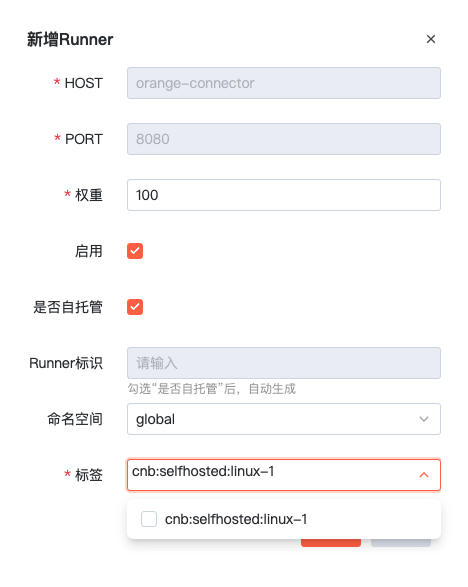
2.1 Create Self-Hosted RUNNER in Admin Console
Note
Tags must start with cnb.
2.2 Connect Self-Hosted RUNNER
Note
① CONNECTOR_ENDPOINT: Make sure to confirm whether HTTPS is enabled and the current environment domain, e.g., wss://connector.yourdomain, and replace this variable in the setup script.
② SELF_HOSTED_ID: After completing step 2 in the Admin Console, you can obtain the unique identifier for this RUNNER.
③ Before running .\orange-runner.exe start or orange-runner start, you can use .\orange-runner.exe or ./orange-runner to start the service and view error logs directly.
④ On Windows, if files are not found, disable hidden file extensions and verify they match expectations.
⑤ On Windows, file creation may have BOM header issues. Please check carefully.
- One-Click Setup Script
curl -fsSL https://docs.cnb.share.ralphlauren.cn/system-runner/scripts/linux.sh | CONNECTOR_ENDPOINT=wss://connector.cnb.share.ralphlauren.cn SELF_HOSTED_ID=xxxx-xxxx-xxxx bash- Configuration and Storage Directories
① Certificate configuration directory: `/etc/orange-ci`
② RUNNER configuration file: `/etc/orange-ci/runner-config.json`
③ Data storage directory: `/data/orange-ci`- Other Common Commands
# Install service
orange-runner install
# Start service
orange-runner start
# Stop service
orange-runner stop
# Uninstall service
orange-runner uninstall
# Remove global command
rm /usr/local/bin/orange-runner
# Check service running status
orange-runner status
# View logs
tail -f /data/orange-runner/logs/app.log- One-Click Setup Script
curl -fsSL https://docs.cnb.share.ralphlauren.cn/system-runner/scripts/mac.sh | CONNECTOR_ENDPOINT=wss://connector.cnb.share.ralphlauren.cn SELF_HOSTED_ID=xxxx-xxxx-xxxx bash- Configuration and Storage Directories
① Certificate configuration directory: `$HOME/orange-ci/etc/orange-ci`
② RUNNER configuration file: `$HOME/orange-ci/etc/orange-ci/runner-config.json`
③ Data storage directory: `$HOME/orange-ci/data/orange-ci`- Other Common Commands
# Install service
orange-runner install
# Start service
orange-runner start
# Stop service
orange-runner stop
# Uninstall service
orange-runner uninstall
# Remove global command
rm /usr/local/bin/orange-runner
# Check service running status
orange-runner status
# View logs
tail -f /data/orange-runner/logs/app.log- One-Click Setup Script
Set-ExecutionPolicy -ExecutionPolicy Unrestricted -Confirm:$False -Force ; invoke-webrequest https://docs.cnb.share.ralphlauren.cn/system-runner/scripts/windows.ps1 -outfile windows.ps1; $env:CONNECTOR_ENDPOINT='wss://connector.cnb.share.ralphlauren.cn'; $env:SELF_HOSTED_ID='xxxx-xxxx-xxxx'; ./windows.ps1- Configuration and Storage Directories
① Certificate configuration directory: `C:/etc/orange-ci`
② RUNNER configuration file: `C:/etc/orange-ci/runner-config.json`
③ Data storage directory: `C:/data/orange-ci`- Common Commands
# cd to the directory where orange-runner.exe is located
cd $HOME\Downloads\orange-runner
# Start service
.\orange-runner.exe start
# Stop service
.\orange-runner.exe stop
# Uninstall service
.\orange-runner.exe uninstall
# Delete exe file
Remove-Item -Path .\orange-runner.exe
# Check service running status
.\orange-runner.exe status
# View logs
Get-Content 'C:\data\orange-runner\logs\app.log' -Wait -Tail 10
FAQ
- When building multi-platform images with
docker buildx, building ARM images fails with:Error while loading /usr/sbin/dpkg-split: No such file or directory
Solution:
docker run --rm --privileged multiarch/qemu-user-static --reset -p yes --credential yesgit cloneworks on the host but times out in pipeline containers.
Cause: IPv4 forwarding must be enabled. cat /proc/sys/net/ipv4/ip_forward should return 1. If not enabled, edit with the following command: