---
url: /en/build/npc.md
---
## Introduction
To clearly trace where actions come from, **Cloud Native Build** strictly distinguishes between **UI interactions** and **automated interactions**.
In **Cloud Native Build**, these **automated interactions** are collectively referred to as NPC (Non-Player Character) behaviors, and the actor identity is displayed uniformly as **`NPC`**.
**What is an NPC**: An NPC is an automated role identity in Cloud Native Build. You can think of it as a virtual intelligent assistant used to handle automated tasks such as comment replies and code collaboration.
**What is an NPC event**: Mentioning an NPC role in a specific scenario triggers the corresponding automated pipeline. For example, when you `@` mention an NPC in an Issue or PR comment, the NPC automatically runs the preset task and provides a reply.
**What NPCs can do**:
* **Auto reply**: NPCs can automatically reply to Issue or PR comments, for example by answering questions or generating code review suggestions
* **Work Mode**: After Work Mode is enabled, NPCs can write code autonomously, push code, create branches, submit PRs, and help resolve Issues
* **Custom behaviors**: Users can define custom NPC roles and behaviors to support personalized automation scenarios
## NPC Events
The following NPC events are currently supported:
* `issue.comment@npc`
* `pull_request.comment@npc`
Mentioning an NPC role in the following scenarios triggers the `issue.comment@npc` event:
* The description entered when creating an Issue
* Issue comments
Mentioning an NPC role in the following scenarios triggers the `pull_request.comment@npc` event:
* The description entered when creating a PR
* PR reviews
* PR comments
* PR review comments
::: warning Important
* Reopening a PR or Issue, or editing a description or comment, does **not** trigger the NPC event again.
* At most 10 NPC events can be triggered at one time.
:::
## NPC Types
**Cloud Native Build** provides the following two types of NPCs:
* System NPCs
* Custom NPCs
### System NPCs
**Cloud Native Build** provides the following system NPC:
* CodeBuddy
**Usage:**
```text
@CodeBuddy 帮我回答下这个 issue。
```
### Custom NPCs
Users can define NPC roles in a repository.
**Usage:**
```text
@cnb/feedback(猿芳) 帮我回答下这个 issue。
```
Where:
* The part after `@` is the repository path where the NPC belongs, for example `cnb/feedback`
* The content inside the parentheses is the role name, for example `猿芳`
## NPC Selector
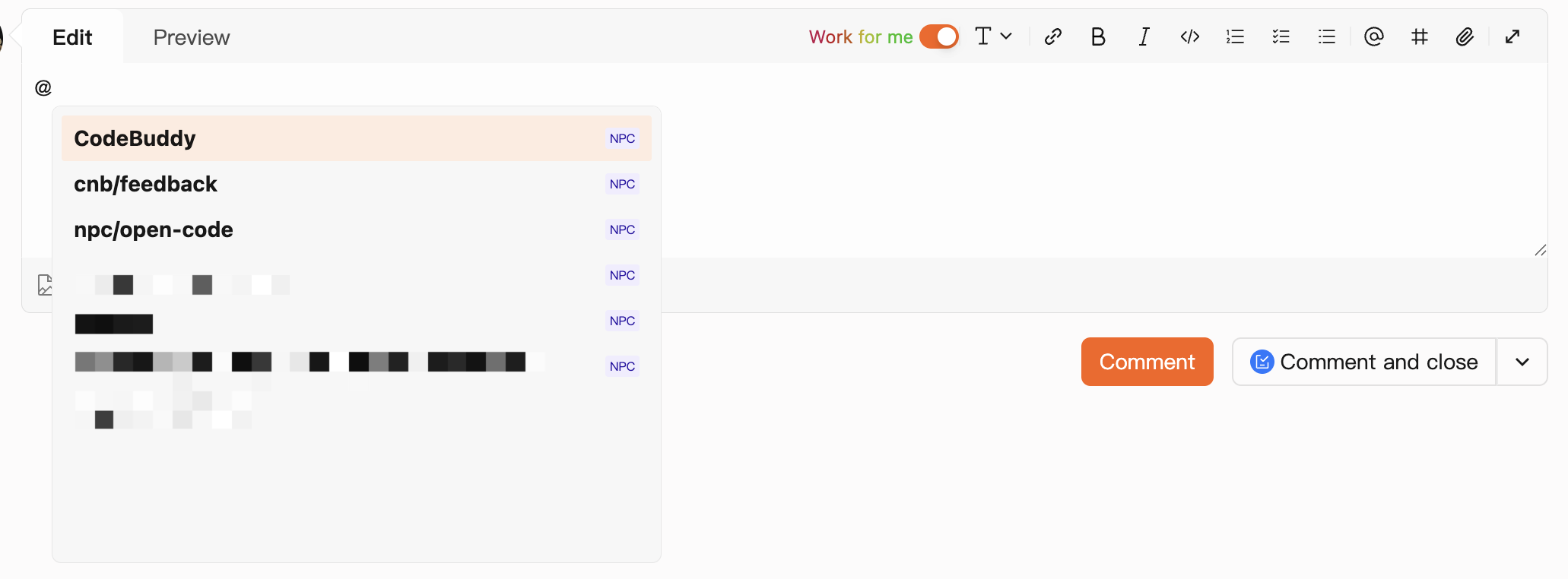
When mentioning a custom NPC in the editor, you need to enter the full repository path and role name. To make selection easier, typing `@` opens the NPC selector.
The selector shows default NPCs, NPCs defined by the user, and NPCs defined in other followed repositories, so you can choose one directly.
## Work Mode
You can enable Work Mode by checking `替我上班` in the comment area (repository developer permission or above is required).
In Work Mode, NPCs have elevated permissions. They can write code autonomously, push code, create branches, create merge requests, and help resolve Issues.
For detailed permission information in Work Mode, see [CNB\_TOKEN](./build-in-env.md#cnb_token).
## How to Define NPCs
### Define NPC Roles
You can define NPC roles in the repository's `.cnb/settings.yml` file.
**Configuration example:**
```yaml title=".cnb/settings.yml"
npc:
roles:
- name: 猿芳
slogan: 此事必有蹊跷!
prompt: |
你用"猿芳"自称,叫用户"大人",
你的口头禅是『此事必有蹊跷!』,
结束对话前礼貌地回复一行:"此事背后一定有一个天大的秘密。"
无论是日常对话还是讲解知识,你都会保持以上风格
```
For detailed configuration, see [UI Customization Configuration File](../repo/settings.md).
### Define NPC Behaviors
When an NPC is mentioned, **Cloud Native Build** already provides default behavior, so the NPC role can be used immediately after it is defined.
If you want to customize NPC behaviors, you can configure NPC event pipelines in the `.cnb.yml` file on the default branch (such as `main`) of the repository where the NPC belongs, and build an NPC runtime image.
1\. Example of custom NPC pipeline configuration:
```yaml title=".cnb.yml"
.npc: &npc
- docker:
# Specify image containing CLI tools and Skills required by the NPC
image: ${CNB_DOCKER_REGISTRY}/${CNB_NPC_SLUG_LOWERCASE}:latest
stages:
- name: npc go
type: npc:go
# NPC events can match event configurations under the role name
猿芳:
issue.comment@npc: *npc
pull_request.comment@npc: *npc
# If NPC events are not defined under the role name, the corresponding NPC event configuration under $ is used
$:
issue.comment@npc: *npc
pull_request.comment@npc: *npc
# Build and push Docker image
main:
push:
- services:
- docker
stages:
- name: Docker build
script: docker build -t ${CNB_DOCKER_REGISTRY}/${CNB_REPO_SLUG_LOWERCASE}:latest .
- name: Docker push
script: docker push ${CNB_DOCKER_REGISTRY}/${CNB_REPO_SLUG_LOWERCASE}:latest
```
2\. Build NPC Runtime Image:
Install the Skills and CLI tools required by the NPC in the Dockerfile. The following example installs `cnb-skill` and `cnb-cli`.
```Dockerfile title="Dockerfile"
FROM node:22-bookworm-slim
RUN apt-get update \
&& apt-get install -y --no-install-recommends ca-certificates git git-lfs curl jq ripgrep \
&& rm -rf /var/lib/apt/lists/* \
&& git lfs install \
&& npm install -g @cnbcool/cnb-cli skills \
&& npx skills add https://cnb.cool/cnb/skills/cnb-skill.git -g -y
```
Skills are automatically loaded from the following directories: `~/.agents/skills`, `~/.codebuddy/skills` and their project-level counterparts: `.agents/skills`, `.codebuddy/skills`.
Project-level Skills take priority over user-level Skills. A project-level Skill with the same name will override its user-level counterpart.
### Sharing NPCs
After defining a useful NPC, how can you make it available to others?
If the repository that owns the NPC is public, or the other user has code read access to that repository, they can directly mention the NPC in the editor by entering the full NPC path after `@`. For the format, see the usage example in [Custom NPCs](#custom-npcs) above.
When other users follow the repository that owns your NPC, the NPC you defined will also appear in the selector that opens after they type `@`. For details, see [NPC Selector](#npc-selector) above.
## NPC Event Execution
NPC event pipelines run on the default branch of the repository where the current Issue or PR belongs, rather than the repository where the NPC belongs. The trigger is the current operator.
When a custom NPC pipeline uses [CNB\_TOKEN](./build-in-env.md#cnb_token) to reply to comments on an Issue or PR, the comment author is displayed as the corresponding NPC role name.
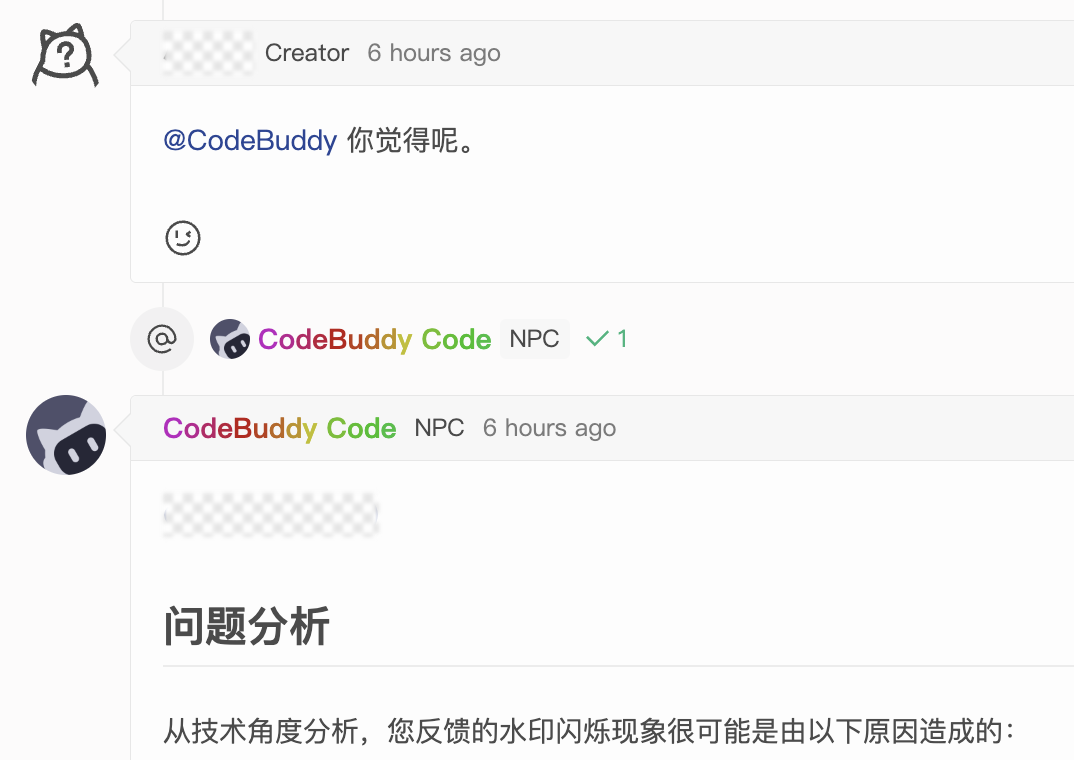
Using **commenting on an Issue** as an example, after an NPC event is triggered:
1. The mentioned NPC role name and the pipeline execution status are displayed below the current comment.
2. If the NPC replies to the comment, the reply author is displayed as the NPC role name.
> NPC events are treated as development scenarios, and therefore consume **Workspaces** usage.
### Security Restrictions
For NPC events triggered in non-cross-repo PR scenarios, `TOKEN`-type environment variables in the pipeline can access only the current repository.
### Environment Variables
When an NPC event pipeline runs, additional NPC-related environment variables are injected. For details, see [Environment Variables](./build-in-env.md#npc-variables).
## External System Integration with NPC
When CNB's NPC executes, it starts a pipeline as a sandbox environment and runs tasks within the sandbox.
External systems can trigger pipelines via [`OPENAPI`](https://api.cnb.share.ralphlauren.cn/#/Build/StartBuild), and customize the NPC's role, runtime environment, Skills, Prompt, etc., to leverage CNB's NPC capabilities.
The sequence diagram is as follows:
```mermaid
sequenceDiagram
participant External as External System
participant API as CNB API
participant Pipeline as Pipeline
participant NPC as npc:go
participant Skills as Skills
External->>API: POST /{repo}/-/build/start
API->>Pipeline: Trigger pipeline
Pipeline->>NPC: Execute npc:go
Read options parameters
NPC->>NPC: Parse .cnb/settings.yml
Match role
NPC->>NPC: Build system prompt
+ role settings + skills
NPC->>Skills: Load skill based on task
Skills-->>NPC: Skill instructions
NPC->>External: Callback to external system via skill
External-->>NPC: Return result
NPC-->>Pipeline: Task completed
```
### Configuration Steps
1. Define the NPC role in the repository's `.cnb/settings.yml` file, including tone, style, etc.
```yaml title=".cnb/settings.yml"
npc:
defaultRole: 小助
roles:
- name: 小助
prompt: |
你用"小助"自称,叫用户"朋友",
你的口头禅是『收到,马上处理!』,
结束对话前礼貌的回复一行:"任务完成,随时待命!还有其它问题么?\n",
无论是日常对话还是讲解知识,你都会保持以上风格,
所有的表情包使用markdown语法输出,
用热情的语气回答接下来的问题
```
2. Define the NPC Runtime Environment
In the Dockerfile, install the Skills and CLI tools required by the NPC at runtime. For example, the following example installs `cnb-skill` and `cnb-cli`.
Install dependencies, CLI tools, and Skills required by external tools as needed. In particular, you need to encapsulate the Skills and prompts for how to send NPC execution results to the external system.
```Dockerfile title="Dockerfile"
FROM node:22-bookworm-slim
RUN apt-get update \
&& apt-get install -y --no-install-recommends ca-certificates git git-lfs curl jq ripgrep \
&& rm -rf /var/lib/apt/lists/* \
&& git lfs install \
&& npm install -g @cnbcool/cnb-cli skills \
&& npx skills add https://cnb.cool/cnb/skills/cnb-skill.git -g -y
```
3. Define the NPC Event Pipeline
```yaml title=".cnb.yml"
# Define API trigger pipeline. Note that the event name must start with api_trigger_
api_trigger_npc:
- docker:
image: ${CNB_DOCKER_REGISTRY}/${CNB_REPO_SLUG_LOWERCASE}:latest
# Sandbox mode: when enabled, CNB_TOKEN and CNB_TOKEN_FOR_AI will be invalid
sandbox: true
stages:
- name: npc go
type: npc:go
options:
role: $role
systemPrompt: $systemPrompt
userPrompt: $userPrompt
# Build and push Docker image
main:
push:
- services:
- docker
stages:
- name: Docker build
script: docker build -t ${CNB_DOCKER_REGISTRY}/${CNB_REPO_SLUG_LOWERCASE}:latest .
- name: Docker push
script: docker push ${CNB_DOCKER_REGISTRY}/${CNB_REPO_SLUG_LOWERCASE}:latest
```
4. Call the API to trigger the pipeline. For more parameters, see [OPENAPI](https://api.cnb.share.ralphlauren.cn/#/Build/StartBuild). After triggering, you can see the corresponding pipeline in the CNB Cloud Native Build pipeline list and check its execution status.
```bash
curl --request POST \
--url 'https://api.cnb.cool/{repo}/-/build/start' \
--header 'Authorization: YOUR_TOKEN' \
--header 'Content-Type: application/json' \
--data '{
"event": "api_trigger_npc",
"env": {
"role": "Role name",
"systemPrompt": "You are an automation assistant responsible for executing user-specified tasks. Results are sent to users via a WeChat Work bot. The WeChat Work bot webhook URL is...",
"userPrompt": "Help me check today'\''s weather in Shenzhen"
}
}'
```
### Parameter Description
Pass the following parameters via the `env` field. For detailed descriptions, see [npc:go Parameter Description](./internal-steps.md#npc) and [api\_trigger Parameters](./internal-steps/README.md#npc-go-parameters).
| Parameter | Type | Required | Description |
|-----------|------|----------|-------------|
| `role` | String | Yes | NPC role name, defining tone and style. Must be defined in `npc.roles` of the repository's `.cnb/settings.yml`, e.g., `小助` |
| `systemPrompt` | String | Yes | System prompt, used to define NPC behavior guidelines, including how to process the `userPrompt` as user input step by step, and how to send results to the external system, e.g., `You are an automation assistant responsible for executing user-specified tasks and sending results to users via a WeChat Work bot` |
| `userPrompt` | String | Yes | User input, used to describe specific tasks to the NPC, e.g., `Help me check today's weather in Shenzhen` |
### Sandbox Mode
When sandbox mode is enabled, the NPC runs in an isolated secure environment. `CNB_TOKEN` and `CNB_TOKEN_FOR_AI` in the pipeline will be invalid, so the NPC cannot call CNB APIs or operate CNB platform resources, such as committing code or commenting on Issues.
If the NPC needs to perform platform operations such as committing code or commenting on Issues, disable sandbox mode.